Best Google Reviews Widgets for Your Website in 2026


Looking to display Google Reviews on your website? Whether you need a sleek review carousel, a compact trust badge, or a full review wall, the right Google Reviews widget can dramatically boost your credibility and conversions.
Want to skip ahead? Browse our free Google Reviews widget templates and customize one instantly - no need to start from scratch.
In this guide, we'll compare the best Google Reviews widgets available in 2026, helping you choose the perfect solution for your needs.
What to Look for in a Google Reviews Widget
Before diving into our top picks, here's what matters most:
- Review Syncing: How reviews are pulled from Google and kept up to date
- Display Options: Carousel, grid, badge, trust box, and other layouts
- Customization: Control over colors, fonts, card styles, and branding
- Filtering: Ability to filter by star rating, date, or keywords
- Performance: Fast loading without slowing your site
- Platform Support: Works on WordPress, Shopify, Wix, and custom sites
1. Embeddable: AI-Powered Custom Google Reviews Widgets

Best for: Fully custom Google Reviews displays built exactly to your specifications with AI.
Embeddable uses AI to build Google Reviews widgets that match your exact requirements. Describe what you want - a review carousel with custom styling, a trust box with rating distribution, or a floating badge - and get a fully functional widget in seconds.
Why Embeddable for Google Reviews
100% Customizable Need a review carousel with your brand colors? A masonry grid with author photos? A compact badge for your checkout page? Embeddable's AI builds exactly what you describe, with no template limitations.
Built-In Reviews Management After the AI builds your widget, a Reviews panel appears in the editor where you can:
- Add your Google Place ID to sync reviews automatically
- Filter reviews by star rating
- Manage multiple review sources (Google + Trustpilot + TripAdvisor)
- Sync reviews on demand
Multiple Display Styles
- Carousel sliders with auto-scroll
- Card grids with filtering
- Trust boxes with rating distribution
- Compact badges for footers and checkout
- Full review walls for dedicated pages
Works Everywhere Add your Google Reviews to any website - WordPress, Shopify, Wix, Squarespace, or custom HTML sites. One simple embed code works everywhere.
Embeddable Pricing
- Free Plan: 25 tokens/month to customize and publish widgets
- Pro Plans: Starting at $19/month for more tokens and features
- One-Time Credits: Available for occasional use
2. Common Ninja: Feature-Rich Google Reviews Widget

Best for: Businesses wanting a dedicated Google Reviews widget with extensive customization and unlimited views.
Common Ninja offers a comprehensive Google Reviews widget with multiple display styles, custom themes, and rich review information.
Key Features
- Multiple layout options (grid, slider, list, masonry)
- Custom themes and color schemes
- Star rating filtering
- Search and filter functionality
- Reviewer photos and dates
- Rating summary with distribution
- "Leave a Review" button
- Responsive design
- Visual editor for easy customization
Common Ninja Pricing
- Free Plan: Basic features with Common Ninja branding
- Pro Plans: Starting at $3.50/month
- Unlimited views
- Remove branding
- Advanced features and customization
3. WP Business Reviews (WordPress Only)

Best for: WordPress users who want a native plugin for displaying Google, Yelp, and Facebook reviews.
WP Business Reviews is a dedicated WordPress plugin that pulls reviews from Google, Yelp, and Facebook directly into your WordPress site.
Key Features
- Native WordPress plugin
- Google, Yelp, and Facebook review sources
- Multiple display templates
- Shortcode and widget support
- Review filtering by platform and rating
- Customizable styles within WordPress
- Works with most WordPress themes
Limitations
- WordPress only - no support for Shopify, Wix, or custom sites
- Requires WordPress plugin installation and maintenance
- Limited to WordPress ecosystem for customization
- No AI-powered customization
WP Business Reviews Pricing
- Single Site: $99/year
- 5 Sites: $149/year
- 25 Sites: $249/year
WordPress-only solution with annual licensing.
4. Elfsight: Pre-Built Google Reviews Templates
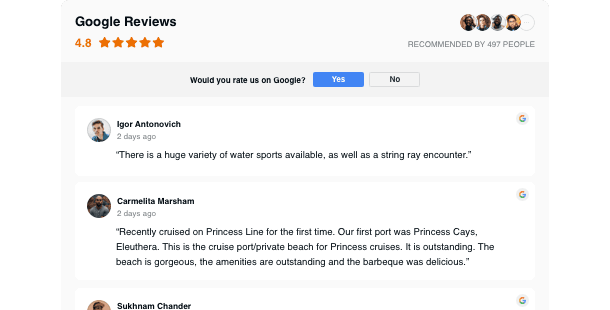
Best for: Businesses wanting ready-made Google Reviews templates with quick setup.
Elfsight offers pre-designed Google Reviews widget templates with a visual editor for basic customization.
Key Features
- Pre-designed review templates
- Visual widget editor
- Multiple layout options
- Basic color and font customization
- Google integration
- Installation guides for various platforms
Limitations
- Template-based (limited creative freedom)
- View-based pricing can get expensive
- Yearly billing only
- Customization restricted to template options
Elfsight Pricing
Starts at $60/year (yearly billing only)
- Free Plan: 200 views, 1 widget, Elfsight branding
- Basic Plan: $5/month ($60/year) - 5,000 views, 3 widgets
- Pro Plan: $10/month ($120/year) - 50,000 views, 9 widgets
- Premium Plan: $20/month ($240/year) - 150,000 views, 21 widgets
Note: Only yearly billing available. View-based limits apply.
Pricing Comparison at a Glance
| Platform | Starting Price | Free Plan | Best For |
|---|---|---|---|
| Embeddable | $19/mo | 25 tokens/month | Fully custom AI-built reviews widgets |
| Common Ninja | $3.50/mo | Yes (with branding) | Feature-rich templates with unlimited views |
| WP Business Reviews | $99/year | No | WordPress-only native plugin |
| Elfsight | $60/year | 200 views | Pre-built templates with quick setup |
Popular Google Reviews Widget Styles
Review Carousel
Auto-scrolling slider showing one or multiple reviews at a time. The most popular choice for homepages and landing pages.
Review Grid
Card layout displaying many reviews at once. Perfect for dedicated testimonial sections and review pages.
Trust Box
Compact summary showing overall rating, star average, review count, and rating distribution. Ideal for headers, sidebars, and above-the-fold placement.
Review Badge
Small floating or inline badge displaying your Google rating. Great for footers, checkout pages, and email signatures.
Review Wall
Full-page masonry layout showcasing all reviews. Perfect for social proof landing pages.
How to Choose the Right Google Reviews Widget
Choose Embeddable if you want:
- Complete creative control with AI customization
- Multiple review sources (Google + Trustpilot + TripAdvisor)
- Built-in reviews management panel
- Custom designs that match your brand perfectly
- No coding required
- Works on any platform
Choose Common Ninja if you want:
- Dedicated Google Reviews widget with rich features
- Unlimited views (no view restrictions)
- Affordable pricing ($3.50/month)
- Visual editor for easy customization
- Multiple layout options out of the box
Choose WP Business Reviews if you want:
- Native WordPress plugin integration
- Multi-platform reviews (Google + Yelp + Facebook)
- WordPress shortcode and widget support
- Stay within the WordPress ecosystem
Choose Elfsight if you want:
- Pre-built templates with quick setup
- Visual editor without coding
- Basic customization needs
- Don't need unlimited views
Tips for Displaying Google Reviews Effectively
- Place Reviews Strategically: Near CTAs, on product pages, and at checkout
- Show the Overall Rating: The aggregate score is often more impactful than individual reviews
- Include Review Count: "4.8 from 523 reviews" is more convincing than just "4.8 stars"
- Keep Reviews Fresh: Regular syncing ensures visitors see recent feedback
- Don't Over-Filter: A few mixed ratings make the positives more believable
- Use Author Photos: Profile images add authenticity to reviews
- Make It Easy to Leave Reviews: Add a "Review Us on Google" button
- Match Your Design: The widget should feel native, not like a third-party add-on
Building a Custom Google Reviews Widget with Embeddable
Here's how easy it is to create a custom widget:
Step 1: Describe Your Widget
Tell the AI exactly what you need:
Build a Google Reviews carousel that shows customer reviews with
star ratings, author photos, and review text. Include overall
rating at the top and smooth auto-scrolling. Make it match
my website's dark theme.
Step 2: Connect Your Reviews
In the CMS editor, open the Reviews panel and add your Google Place ID. Your real reviews sync automatically.
Step 3: Customize the Design
The AI matches your website's design automatically. Then refine:
- "Show only 4-5 star reviews"
- "Add a 'Leave a Review' button"
- "Make the cards more compact for mobile"
Step 4: Embed Anywhere
Get a simple embed code that works on any website platform.
Conclusion
The best Google Reviews widget for your website depends on your specific needs:
- For maximum flexibility and AI-powered customization, Embeddable offers fully custom reviews widgets with built-in reviews management
- For feature-rich templates with unlimited views, Common Ninja provides extensive options at affordable pricing
- For WordPress-only sites, WP Business Reviews offers native plugin integration
- For quick pre-built templates, Elfsight offers ready-made solutions
Start with free options to test what works best, then upgrade as your needs grow.
Ready to display Google Reviews on your website? Create a custom Google Reviews widget with Embeddable in minutes - describe what you want and let AI build it for you. No coding required!
Build Any Widget with AI in Seconds
Forms, calculators, quizzes, popups & any custom widget — describe it and AI builds it.
Try It FreeFree tier · No credit card