How to Make Your Lovable Website SEO Friendly & Indexable on Google


Building websites with AI tools like Lovable is revolutionary. You can create beautiful, functional websites in minutes with simple prompts. But there's a catch - by default, Lovable websites aren't optimized for search engines.
If you're building a website to attract customers, generate leads, or establish your online presence, being invisible to Google is a dealbreaker. The good news? There's a solution, and I'll walk you through it step by step.
But before we dive into making Lovable SEO-friendly, let me introduce you to a platform that's SEO-ready from day one.
Embeddable: SEO Friendly Out of the Box
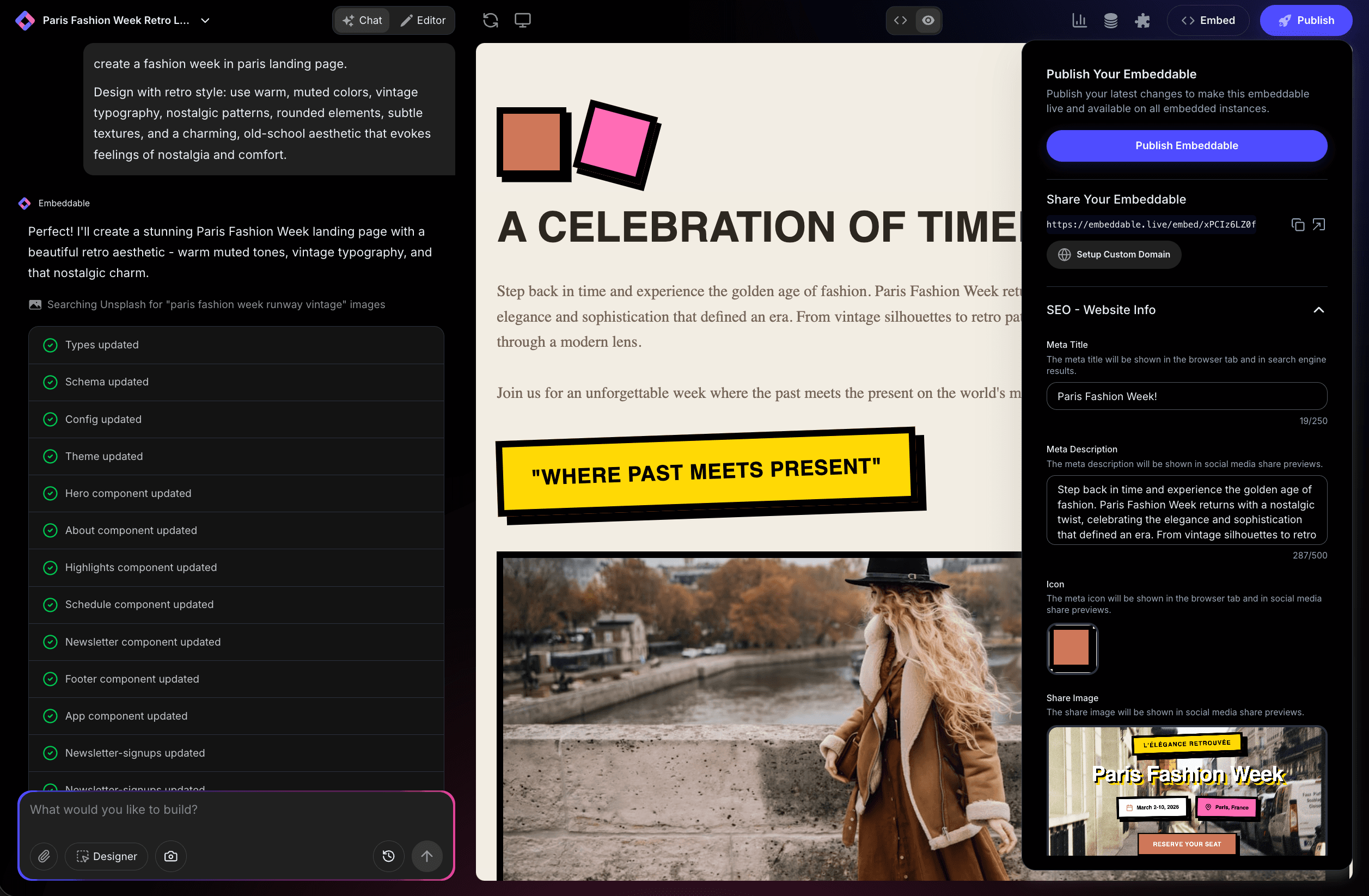
If you're looking for a platform that handles SEO automatically, Embeddable has you covered. Embeddable is an AI-powered platform for building marketing landing pages and custom embeddable widgets that you can add to your existing website or business. Unlike many website builders, Embeddable is built with SEO as a core feature, not an afterthought.
Why Embeddable Works for SEO Right Away
Pre-rendered HTML from the start. Every page you create with Embeddable is served as fully rendered HTML to search engines. No JavaScript rendering required, no workarounds, no technical gymnastics. Google sees exactly what your visitors see - immediately.
Content hydration that just works. Your pages load fast with pre-rendered content, then become interactive once JavaScript loads. This gives you the best of both worlds: instant SEO visibility and modern interactivity.
Full meta SEO control in the editor. You don't need to touch code to optimize your pages. Control your title tags, meta descriptions, Open Graph tags, and more directly from the visual editor. Change them anytime, see the results instantly.
Perfect for landing pages. Whether you're building product pages, campaign landing pages, or lead capture forms, Embeddable gives you the SEO foundation you need to rank and convert.
Works as embeddable widgets too. Beyond standalone landing pages, you can create widgets and embed them on your existing website. Add SEO-optimized forms, popups, galleries, and more to any site without losing search visibility.
Now, let's get into why Lovable websites struggle with SEO and how to fix it.
The Lovable SEO Problem: Why Your Site Isn't Getting Indexed
Lovable generates single-page React applications using client-side rendering. This means your website's content is generated in the browser using JavaScript after the initial page loads.
Here's what happens when Google tries to crawl your Lovable site:
- Googlebot requests your page
- Your server sends an empty HTML shell (just a
<div id="root"></div>with JavaScript files) - Google may or may not execute the JavaScript to see your content
- Your content might not get indexed or might be delayed significantly
While Google can execute JavaScript, it's not guaranteed, it's slower, and it's far less reliable than serving pre-rendered HTML. Sites that rely solely on client-side rendering often see:
- Pages not appearing in search results
- Delayed indexing (weeks or months)
- Incomplete content indexing
- Poor rankings even when indexed
- Missing meta tags and structured data
If you're serious about SEO, you need Static Site Generation (SSG) or Server-Side Rendering (SSR). For Lovable, we'll implement SSG.
What is Static Site Generation (SSG)?
Static Site Generation pre-renders your pages at build time, creating complete HTML files for each route before deployment. When someone visits your site, they get a fully formed HTML page instantly - no JavaScript execution required.
Benefits of SSG for SEO:
- Instant indexing - Search engines see your content immediately
- Perfect crawlability - No JavaScript execution required
- Faster load times - Pre-rendered HTML loads instantly
- Better Core Web Vitals - Improves your Google ranking factors
- Reliable meta tags - SEO tags are in the HTML source
- Social media previews work - OpenGraph tags are visible to social platforms
Now let's implement SSG in your Lovable website.
How to Make Your Lovable Website SEO Friendly: Complete Guide
This workaround comes from Ben Milsom at Steady Bow, who's tested and refined this approach extensively. I'll walk you through every step.
Important Warning: Use with New Projects
⚠️ This works best with brand-new Lovable builds. It tends to break when added to existing projects with lots of custom code. If you have an existing site, be prepared to roll back changes if issues arise. Test thoroughly before going live.
Prerequisites
Before starting, make sure you have:
- A Lovable account and project
- Your website already built (or ready to build)
- Access to deploy to Netlify
- Basic familiarity with package.json and build commands
Let's get started.
Step 1: Create Your Lovable Website
If you haven't already, create your website in Lovable with your initial prompts. Build out your pages, design, and content as you normally would.
Pro tip: Plan your site structure now. Think about which pages you need:
- Home page (/)
- About page (/about)
- Services or Products pages
- Blog or Resources section
- Contact page
Each page will need to be defined in your routes for SSG to work properly.
Step 2: Implement SSG with the Master Prompt
Now comes the crucial step. Copy the following prompt EXACTLY and paste it into Lovable:
#IMPLEMENT SSG (STATIC SITE GENERATION) EXACTLY AS PER THE BELOW WITHOUT DEVIATION

##FOLLOWING IMPLEMENTATION PROVIDE ME WITH INSTRUCTION ON HOW TO MANUALLY REPLACE/UPDATE THE EXISTING SCRIPTS NODE IN THE PACKAGE.JSON  INCLUDING ANY TRAILING COMMAS

# Added placeholder to insert rendered content
diff --git index.html index.html
--- index.html
+++ index.html
@@ -13 +13 @@
-    <div id="root"></div>
+    <div id="root"><!--app-html--></div>

# Added prerender script to generate static HTML
# NOTE THIS MUST BE .JS AS WILL BE RUN VIA NODE
diff --git prerender.js prerender.js
new file mode 100644
--- /dev/null
+++ prerender.js
@@ -0,0 +1,35 @@
+import fs from 'node:fs'
+import path from 'node:path'
+import url from 'node:url'
+
+const __dirname = path.dirname(url.fileURLToPath(import.meta.url))
+const toAbsolute = (p) => path.resolve(__dirname, p)
+
+const template = fs.readFileSync(toAbsolute('dist/index.html'), 'utf-8')
+const { render } = await import('./dist/server/entry-server.js')
+
+const routesToPrerender = fs
+  .readdirSync(toAbsolute('src/pages'))
+  .map((file) => {
+    const name = file.replace(/\.tsx$/, '').toLowerCase()
+    return name === 'index' ? `/` : `/${name}`
+  })
+
+;(async () => {
+  for (const url of routesToPrerender) {
+    const appHtml = render(url);
+    const html = template.replace(`<!--app-html-->`, appHtml)
+
+    const filePath = `dist${url === '/' ? '/index' : url}.html`
+    fs.writeFileSync(toAbsolute(filePath), html)
+    console.log('pre-rendered:', filePath)
+  }
+})()

# Removed BrowserRouter since SSR requires StaticRouter
diff --git src/App.tsx src/App.tsx
--- src/App.tsx
+++ src/App.tsx
@@ -6 +6 @@
-import { BrowserRouter, Routes, Route } from "react-router-dom";
+import { Routes, Route } from "react-router-dom";

@@ -20,11 +20,9 @@
-      <BrowserRouter>
       <AnimatePresence mode="wait">
         <Routes>
           <Route path="/" element={<Index />} />
           <Route path="/about" element={<About />} />
           <Route path="/varieties" element={<Varieties />} />
           <Route path="*" element={<NotFound />} />
         </Routes>
       </AnimatePresence>
-      </BrowserRouter> # Moved BrowserRouter to main.tsx for conditional usage

# Added entry-server.tsx to handle SSG rendering
diff --git src/entry-server.tsx src/entry-server.tsx
new file mode 100644
--- /dev/null
+++ src/entry-server.tsx
@@ -0,0 +1,14 @@
+import ReactDOMServer from 'react-dom/server';
+import { StaticRouter } from 'react-router-dom/server';
+import App from './App';
+
+export function render(url: string) {
+  const html = ReactDOMServer.renderToString(
+    <StaticRouter location={url}>
+      <App />
+    </StaticRouter>
+  );
+
+  return html;
+}

# Added hydration for SSG and moved BrowserRouter to main.tsx
diff --git src/main.tsx src/main.tsx
--- src/main.tsx
+++ src/main.tsx
@@ -1 +1,2 @@
-import { createRoot } from 'react-dom/client'
+import { createRoot, hydrateRoot } from 'react-dom/client'
+import { BrowserRouter } from 'react-router-dom'

@@ -5 +6,12 @@
-createRoot(document.getElementById("root")!).render(<App />);
+const root = document.getElementById("root")!;
+const app = (
+  <BrowserRouter>
+    <App />
+  </BrowserRouter>
+);
+
+# Use hydration for SSR in production
+if (import.meta.env.PROD) {
+  hydrateRoot(root, app);
+} else {
+  createRoot(root).render(app);
+}

# Updated build script to support SSG and prerendering
# NOTE: PROVIDE INSTRUCTION ON HOW TO DO THIS MANUALLY AS THIS CANNOT BE IMPLEMENTED BY YOU
diff --git package.json package.json
--- package.json
+++ package.json
@@ -8 +8,4 @@
-    "build": "vite build",
+    "build": "npm run build:client && npm run build:server && npm run build:prerender",
+    "build:client": "vite build", # Builds the client-side app
+    "build:server": "vite build --ssr src/entry-server.tsx --outDir dist/server", # Builds the SSR entry point
+    "build:prerender": "node prerender", # Runs prerendering to generate static pages
What This Prompt Does
Let me break down what's happening here:
1. Adds a placeholder in index.html - The <!--app-html--> comment is where your pre-rendered content will be injected.
2. Creates prerender.js - This script runs at build time, generates HTML for each route, and saves them as static files.
3. Updates App.tsx - Removes BrowserRouter from App component (it moves to main.tsx for conditional rendering).
4. Creates entry-server.tsx - This is the server-side rendering entry point that React uses to generate HTML strings.
5. Updates main.tsx - Adds hydration logic so pre-rendered HTML becomes interactive in the browser, and wraps the app with BrowserRouter for client-side navigation.
6. Updates package.json build scripts - Creates a multi-step build process: client build → server build → prerendering.
Step 3: Update package.json Scripts Manually
Lovable will make most of the changes, but it cannot automatically update the package.json scripts section. You'll need to do this manually.
Lovable will give you instructions, but here's what you need to do:
Open your package.json file (Lovable will show you this in the file tree)
Find the scripts section that looks something like this:
"scripts": {
  "dev": "vite",
  "build": "vite build",
  "preview": "vite preview"
}
Replace the build script with these three scripts:
"scripts": {
  "dev": "vite",
  "build": "npm run build:client && npm run build:server && npm run build:prerender",
  "build:client": "vite build",
  "build:server": "vite build --ssr src/entry-server.tsx --outDir dist/server",
  "build:prerender": "node prerender",
  "preview": "vite preview"
}
Important: Make sure you include commas correctly between scripts. The last script in the object should NOT have a trailing comma.
Save the file and you're done with this step.
Step 4: Deploy to Netlify
Now it's time to deploy your site.
Go to Netlify.com and sign up or log in to your account.
Connect your Lovable project to Netlify. You can do this by:
- Exporting your Lovable project to GitHub
- Connecting that GitHub repository to Netlify
- Or using Lovable's direct Netlify integration if available
Configure your build settings in Netlify:
Build command: This is critical. Netlify might auto-detect npm run build:client, but you need to change it to just:
bun run build
Or if you're not using Bun:
npm run build
Publish directory: Should be dist
Don't include :client in your build command. This is a common mistake that will cause your SSG to fail.
Save your settings and trigger a deploy.
Step 5: Update prerender.js for Multiple Pages
If you have multiple pages (which you probably do), you need to make sure prerender.js knows about all your routes.
Prompt Lovable with this:
update prerender.js so that the output html files match the routes defined in App.tsx, ensuring that any sub directories exist before writing the files
This ensures that:
- All routes in your App.tsx are pre-rendered
- Subdirectories are created (for routes like
/blog/post-name) - Your folder structure matches your URL structure
Understanding Route Mapping
Let's say your App.tsx has these routes:
<Routes>
  <Route path="/" element={<Home />} />
  <Route path="/about" element={<About />} />
  <Route path="/services" element={<Services />} />
  <Route path="/blog" element={<Blog />} />
  <Route path="/contact" element={<Contact />} />
</Routes>
After the build completes, you should have these files:
dist/index.html(for /)dist/about.html(for /about)dist/services.html(for /services)dist/blog.html(for /blog)dist/contact.html(for /contact)
If you check your build logs, you should see:
pre-rendered: dist/index.html
pre-rendered: dist/about.html
pre-rendered: dist/services.html
pre-rendered: dist/blog.html
pre-rendered: dist/contact.html
Step 6: Add New Pages (Future Updates)
Whenever you add new pages to your Lovable website, you need to remind Lovable to update the prerender configuration.
Use this prompt every time you add pages:
Make sure to include these/this new content in prerender.js
This ensures your new pages get pre-rendered and are SEO-friendly from day one.
Verify Your SSG Implementation is Working
After deployment, you need to verify that SSG is actually working. Here's how:
Test 1: View Page Source
Visit your live site and right-click anywhere on the page, then select View Page Source (or press Ctrl+U / Cmd+Option+U).
Look for your content in the HTML. You should see your actual page content inside the <div id="root"> tag, not just an empty div.
Bad (client-side only):
<div id="root"></div>
<script src="/assets/index-abc123.js"></script>
Good (SSG working):
<div id="root">
  <header><h1>Welcome to My Website</h1></header>
  <main>
    <p>This is my homepage content that Google can see!</p>
  </main>
</div>
<script src="/assets/index-abc123.js"></script>
Test 2: Check with cURL (How Google Sees Your Site)
This is one of the most reliable ways to verify if your content is available to Google crawlers. Using curl simulates what search engine bots see when they crawl your site-pure HTML without JavaScript execution.
Run this command in your terminal:
curl https://yourwebsite.comReplace yourwebsite.com with your actual domain.
What to look for:
Bad (client-side only, not SEO-friendly):
<!DOCTYPE html>
<html>
  <head>...</head>
  <body>
    <div id="root"></div>
    <script src="/assets/index-abc123.js"></script>
  </body>
</html>
If you see only an empty <div> and JavaScript files, your content is being injected client-side after the page loads. Google might not index this content reliably.
Good (SSG working, SEO-friendly):
<!DOCTYPE html>
<html>
  <head>...</head>
  <body>
    <div id="root">
      <header>
        <h1>Welcome to My Website</h1>
      </header>
      <main>
        <p>This is my homepage content that Google can see!</p>
        <section>...</section>
      </main>
    </div>
    <script src="/assets/index-abc123.js"></script>
  </body>
</html>
If you see your actual page content-headings, paragraphs, navigation, all your text-inside the HTML response, you're good to go. This is exactly what Google crawlers will see.
Why this matters: When content is injected via JavaScript after page load, search engines may not execute that JavaScript or may delay indexing significantly. If curl shows your content, Google can definitely see it too.
Pro tip: Test multiple pages, not just your homepage:
curl https://yourwebsite.com/about
curl https://yourwebsite.com/services
curl https://yourwebsite.com/blog
Test 3: Disable JavaScript
In Chrome:
- Open DevTools (F12)
- Press Ctrl+Shift+P / Cmd+Shift+P
- Type "Disable JavaScript"
- Select "Debugger: Disable JavaScript"
- Refresh the page
Your content should still be visible. If the page goes blank or shows only a loading spinner, SSG isn't working.
Test 4: Use Google's Rich Results Test
Go to Google's Rich Results Test: https://search.google.com/test/rich-results
Enter your URL and click "Test URL"
Check the HTML in the results. Google should see your fully rendered content, not an empty div.
Test 5: Check Netlify Build Logs
Go to your Netlify dashboard and check your latest build logs.
Look for prerender output. You should see lines like:
pre-rendered: dist/index.html
pre-rendered: dist/about.html
If you don't see these, your prerender script didn't run correctly.
Common Issues and How to Fix Them
Issue 1: Build Fails with "Cannot find module 'react-router-dom/server'"
Solution: Make sure react-router-dom is installed with server support. Prompt Lovable:
ensure react-router-dom is properly installed with server support for SSG
Issue 2: Pages Show 404 on Netlify
Solution: You need to configure redirects. Create a netlify.toml file in your project root:
prompt Lovable to create netlify.toml with proper redirects for SPA routing
The file should contain:
[[redirects]]
  from = "/*"
  to = "/index.html"
  status = 200
Issue 3: Some Routes Not Pre-rendering
Solution: Verify all routes are in App.tsx and prompt Lovable to update prerender.js:
update prerender.js to match all routes in App.tsx, list all current routes for debugging
Issue 4: Hydration Errors in Console
Solution: This happens when server-rendered HTML doesn't match client-rendered HTML. Common causes:
- Dynamic content based on window or document objects
- Third-party scripts that modify the DOM
- Date/time rendering (server vs client time difference)
Fix: Wrap dynamic content in useEffect or check for typeof window !== 'undefined' before accessing browser APIs.
Issue 5: Prerender Script Fails Silently
Solution: Add error handling to prerender.js. Prompt Lovable:
add try-catch error handling and detailed logging to prerender.js so I can debug any failures
Advanced SEO Optimization for Lovable Sites
Once you have SSG working, take your SEO to the next level:
Add Unique Meta Tags to Each Page
Each page needs unique title tags and meta descriptions. In your page components, add:
import { Helmet } from 'react-helmet-async';

function AboutPage() {
  return (
    <>
      <Helmet>
        <title>About Us - Your Company Name</title>
        <meta name="description" content="Learn about our mission and team..." />
        <meta property="og:title" content="About Us - Your Company Name" />
        <meta property="og:description" content="Learn about our mission..." />
      </Helmet>
      <main>
        {/* Your page content */}
      </main>
    </>
  );
}
Prompt Lovable:
install react-helmet-async and add unique SEO meta tags to each page component with appropriate titles and descriptions
Generate a Sitemap
Help Google discover all your pages with a sitemap.
Create sitemap.xml in your public folder:
<?xml version="1.0" encoding="UTF-8"?>
<urlset xmlns="http://www.sitemaps.org/schemas/sitemap/0.9">
  <url>
    <loc>https://yoursite.com/</loc>
    <lastmod>2025-01-15</lastmod>
    <changefreq>weekly</changefreq>
    <priority>1.0</priority>
  </url>
  <url>
    <loc>https://yoursite.com/about</loc>
    <lastmod>2025-01-15</lastmod>
    <changefreq>monthly</changefreq>
    <priority>0.8</priority>
  </url>
  <!-- Add all your pages -->
</urlset>
Or automate it by prompting Lovable:
create a script to automatically generate sitemap.xml from the routes in App.tsx during build
Add Structured Data
Help search engines understand your content with schema.org structured data.
For a local business:
<Helmet>
  <script type="application/ld+json">
    {JSON.stringify({
      "@context": "https://schema.org",
      "@type": "LocalBusiness",
      "name": "Your Business Name",
      "description": "Your business description",
      "url": "https://yoursite.com",
      "telephone": "+1-555-555-5555",
      "address": {
        "@type": "PostalAddress",
        "streetAddress": "123 Main St",
        "addressLocality": "City",
        "addressRegion": "State",
        "postalCode": "12345"
      }
    })}
  </script>
</Helmet>
For a blog post:
<script type="application/ld+json">
  {JSON.stringify({
    "@context": "https://schema.org",
    "@type": "BlogPosting",
    "headline": "Your Post Title",
    "description": "Post description",
    "author": {
      "@type": "Person",
      "name": "Author Name"
    },
    "datePublished": "2025-01-15"
  })}
</script>
Create robots.txt
Tell search engines how to crawl your site. Create public/robots.txt:
User-agent: *
Allow: /

Sitemap: https://yoursite.com/sitemap.xml
Implement Canonical URLs
Prevent duplicate content issues with canonical tags:
<Helmet>
  <link rel="canonical" href="https://yoursite.com/current-page" />
</Helmet>
Monitoring Your SEO Success
After implementation, track your progress:
Submit to Google Search Console
- Go to Google Search Console (search.google.com/search-console)
- Add your property (your website URL)
- Verify ownership (via DNS or HTML file)
- Submit your sitemap (yourdomain.com/sitemap.xml)
- Request indexing for key pages using the URL Inspection tool
Check Indexing Status
In Google Search Console:
- Go to "Coverage" or "Pages" report
- Look for "Valid" pages (these are indexed)
- Check for "Excluded" or "Error" pages that need fixing
Manual check in Google:
Type site:yourdomain.com in Google search to see all indexed pages.
Track Rankings
Use tools like:
- Google Search Console (Performance report)
- Ahrefs
- SEMrush
- Moz
Track your target keywords and watch your rankings improve over time.
Monitor Core Web Vitals
Check PageSpeed Insights: https://pagespeed.web.dev/
Your SSG implementation should significantly improve:
- Largest Contentful Paint (LCP) - How fast the main content loads
- First Input Delay (FID) - How quickly the page becomes interactive
- Cumulative Layout Shift (CLS) - How stable the page is during loading
When Lovable SEO Isn't Worth the Hassle
Let's be honest-this workaround works, but it's complex, requires maintenance, and can break with updates.
Consider switching to Embeddable if:
- You don't want to maintain custom SSG configurations
- You're building landing pages for marketing campaigns
- You need reliable SEO without technical overhead
- You want full control over meta tags without touching code
- You're embedding widgets on existing websites
- Time to market is critical
Embeddable handles all of this automatically. No scripts to update, no build configurations to maintain, no worrying about whether Google can see your content.
Real-World Use Cases for Embeddable
Scenario 1: Marketing Agency You're building landing pages for multiple clients. Each needs unique SEO, fast deployment, and reliable indexing. Embeddable lets you create, optimize, and deploy pages in minutes-no SSG configuration per site.
Scenario 2: SaaS Company You need feature landing pages, pricing pages, and lead capture forms that rank well and convert. Embeddable's pre-rendered HTML ensures instant indexing, while the visual editor lets your marketing team control SEO without developer help.
Scenario 3: E-commerce Business You want to add product widgets, promotional popups, and email capture forms to your existing Shopify or WooCommerce site. Embeddable widgets are SEO-friendly and embed seamlessly without affecting your site's performance.
Scenario 4: Content Creator You're building a portfolio or blog that needs to rank on Google. Embeddable's automatic SEO means you focus on creating content, not configuring build scripts.
Beyond Landing Pages: Embeddable Widgets for Your Website
One of Embeddable's unique strengths is the ability to create widgets you can embed anywhere-and they're SEO-friendly.
What can you build?
- Forms - Contact forms, lead capture, surveys
- Popups - Email opt-ins, announcements, exit-intent
- Galleries - Image galleries, portfolios, before/after sliders
- Pricing tables - Dynamic pricing comparisons
- Testimonials - Customer reviews and social proof
- CTAs - Calls-to-action, banners, notifications
- Calculators - ROI calculators, pricing estimators
- Calendars - Event calendars, booking widgets
Embed them on any website:
- WordPress
- Shopify
- Webflow
- Squarespace
- Wix
- Custom HTML sites
- Literally anywhere you can add an embed code
And they're SEO-friendly. Unlike many widget builders that load content via JavaScript after page load, Embeddable widgets include pre-rendered content that search engines can index.
Browse Embeddable templates to see what you can build.
Lovable + Embeddable: A Hybrid Approach
Here's a strategy that combines the strengths of both platforms:
Use Lovable for:
- Internal tools and dashboards (where SEO doesn't matter)
- Rapid prototyping of app interfaces
- Client-side heavy applications
Use Embeddable for:
- Landing pages that need to rank
- Lead capture forms and popups
- Marketing campaign pages
- SEO-critical content
This gives you Lovable's AI-powered speed for internal apps and Embeddable's SEO reliability for public-facing pages.
You can even embed Embeddable widgets inside your Lovable site for the best of both worlds.
Final Thoughts: Choose the Right Tool for the Job
Making Lovable SEO-friendly is possible with the SSG workaround outlined in this guide. It works, it's been tested, and it can get your AI-built site indexed on Google.
But it's not plug-and-play. You're maintaining custom configurations, updating scripts when you add pages, and troubleshooting build issues when things break.
Ask yourself:
- Do I have time to maintain this configuration?
- Will I remember to update prerender.js when adding pages?
- Am I comfortable debugging build script issues?
- Is this the best use of my development time?
If the answer is no, Embeddable gives you SEO-friendly websites and widgets without the configuration overhead. Pre-rendered HTML, content hydration, and full meta control-all built in from day one.
Ready to build SEO-friendly landing pages and widgets? Start with Embeddable for free and see the difference pre-rendered HTML makes for your search rankings.
Already using Lovable and want to implement SSG? Follow the steps in this guide carefully, test thoroughly, and monitor your indexing progress in Google Search Console.
Either way, you now have the knowledge to make sure your website gets found on Google.
Need help with SEO-friendly web development? Whether you choose Lovable with SSG or Embeddable's built-in SEO, you now have the tools to make sure your website gets found.
Build Any Widget with AI in Seconds
Forms, calculators, quizzes, popups & any custom widget — describe it and AI builds it.
Try It FreeFree tier · No credit card