How to Increase Website Engagement with Custom Widgets in 2026

Your website gets traffic. But are those visitors actually engaging with your content? Or are they just scrolling past and bouncing?
Website engagement isn't about page views anymore. It's about interaction. It's about getting visitors to do something rather than passively consuming content.
The most effective way to increase engagement? Interactive widgets that turn your static website into an active experience.
In this guide, I'll show you exactly how to use custom widgets to boost engagement, with real examples and actionable strategies you can implement today.
Why Website Engagement Actually Matters
Let's be clear: engagement isn't a vanity metric. Higher engagement directly impacts your bottom line.
When visitors engage with your content:
- Conversion rates increase by 3-5x (they're invested in your solution)
- Time on site doubles (giving you more opportunities to convert)
- Bounce rates drop by 40-60% (engaged visitors explore more pages)
- SEO rankings improve (search engines reward engaging content)
But here's the thing: telling people to "engage more" doesn't work. You need to give them something interactive to engage with.
That's where widgets come in.
The Interactive Widget Strategy
Static content creates passive visitors. Interactive widgets create active participants.
Think about the difference:
Static content: "Our pricing starts at $49/month"
Interactive widget: Price calculator where visitors input their specific needs
Static content: "Take our quiz to find your style"
Interactive widget: Product recommendation quiz with instant personalized results
Static content: "Contact us for more information"
Interactive widget: AI chatbot that qualifies leads and answers questions 24/7
See the difference? Interactive widgets transform intentions into actions.
7 Widget Types That Drive Real Engagement
Let me break down the widget categories that consistently drive the highest engagement rates:
1. Calculator Widgets
When visitors use a calculator, they're mentally committing to your solution. They're inputting their real data, seeing real numbers, and imagining themselves as customers.
Top-performing calculator types:
- Mortgage calculators (real estate sites see 60%+ engagement)
- ROI calculators (B2B companies report 3x more qualified leads)
- BMI calculators (health sites average 4 minutes time-on-page)
- Savings calculators (financial services see 40% conversion lift)
Pro tip: Add a "Get My Custom Quote" button at the end of calculator results. You've already captured their attention—now capture their email.
2. Quiz & Assessment Widgets
Quizzes are engagement goldmines. Why? Because people love learning about themselves.
But not all quizzes work. Here's what does:
Personality quizzes create emotional connections. "What's your design style?" beats "Browse our products" every time.
Product recommendation quizzes segment your audience while providing value. E-commerce sites using these see average order values increase by 25-35%.
Knowledge assessment quizzes position you as an authority. Educational companies and consultants use these to qualify leads while demonstrating expertise.
Want to see this in action? Check out our complete guide on building custom quizzes.
3. Form & Popup Widgets
Forms get a bad rap. But that's because most forms are boring.
Make your forms engaging:
Multi-step forms break complex questions into manageable chunks. Completion rates jump from 20% to 60%+ with proper step design.
Conditional forms show relevant questions based on previous answers. Smart forms that adapt feel like conversations, not interrogations.
Exit-intent popups with real value propositions (not just "Subscribe!") can recover 10-15% of abandoning visitors.
The secret? Give before you ask. Offer a calculator, a discount code, or a useful resource first. Then request the email.
4. Chatbot Widgets
An AI-powered chatbot engages visitors the moment they land on your site.
But here's the catch: most chatbots annoy people because they're too aggressive or too dumb.
Smart chatbot engagement:
- Wait 15-20 seconds before initiating contact (let visitors browse first)
- Ask contextual questions based on the page they're viewing
- Provide instant value (answer common questions, offer resources)
- Qualify intelligently without feeling like an interrogation
Real example: A SaaS company added a contextual chatbot that asked "Looking for [specific feature]?" on feature pages. Response rate: 23%. Qualified lead rate from those responses: 41%.
Learn more in our guide: How AI-Powered Chatbots Enhance Website Engagement.
5. Interactive Content Widgets
Content widgets that let visitors do something outperform static content every time:
Before/after sliders work brilliantly for portfolios, case studies, and transformations. Visitors spend 3x longer viewing interactive comparisons than static images.
Image carousels give visitors control. Let them browse at their own pace instead of auto-playing slideshows they can't control.
Video players with custom calls-to-action increase watch time by 40%. Add strategic CTAs at engagement peaks, not just at the end.
Timeline widgets make complex stories interactive. Company histories, project processes, and customer journeys become explorable experiences.
6. Social Proof & Urgency Widgets
FOMO is real, and these widgets leverage it ethically:
Social proof notifications ("Sarah from Boston just signed up") create movement. Real-time activity proves your solution works.
Countdown timers create urgency for limited offers. But use them honestly—fake scarcity destroys trust.
Live counters show real metrics (customers served, projects completed, hours saved). Movement equals credibility.
Testimonial carousels let visitors browse real reviews at their pace. Authenticity wins over perfection.
7. Utility & Tool Widgets
Give visitors tools they can actually use:
Calendar widgets let visitors book immediately instead of emailing back and forth. Service businesses report 30% more bookings.
Comparison tables help decisions. Make comparing options easy and you remove friction from buying.
FAQ accordions let visitors find answers quickly. Each click is an engagement signal, and answered questions move sales forward.
Building Custom Widgets: The AI-Powered Approach
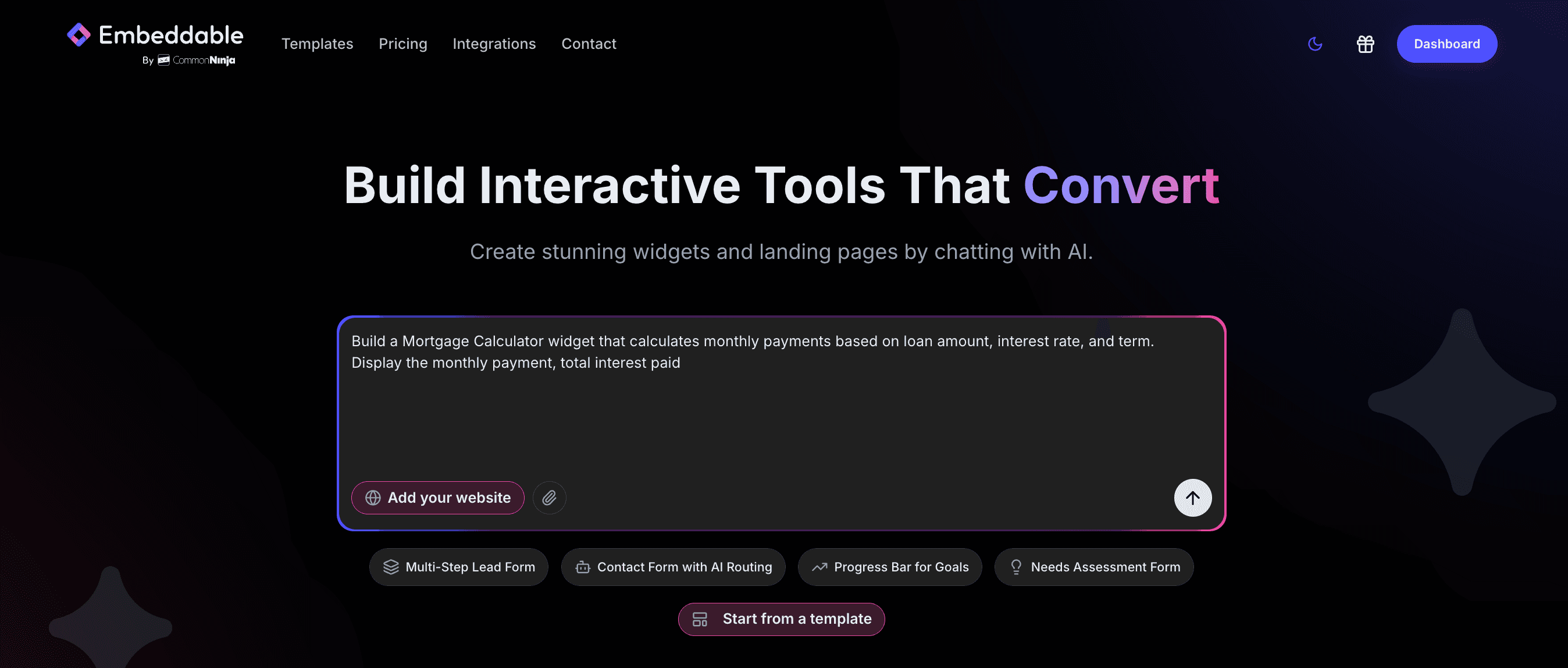
Here's where it gets interesting. You don't need developers anymore.
With AI-powered widget builders, you can create custom interactive elements in minutes:
Step 1: Describe Your Widget
Instead of choosing from limited templates, describe what you want:
"I need a mortgage calculator for first-time homebuyers that includes property tax and insurance estimates. Make it mobile-friendly with a modern blue theme."
Step 2: AI Builds It
The AI understands context and creates exactly what you described—not a generic template you have to hack.
Step 3: Customize the Design
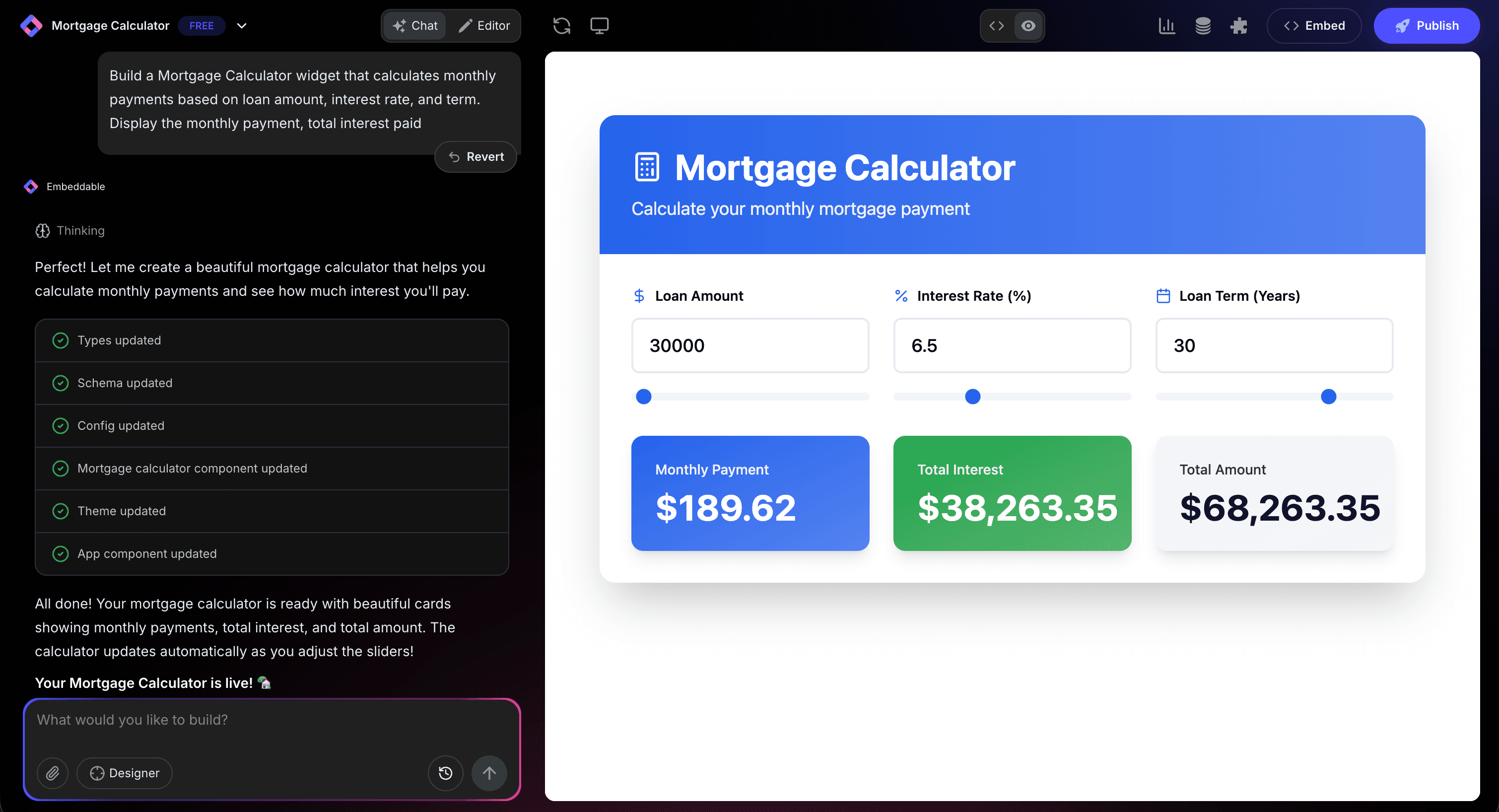
Want to tweak colors, fonts, or functionality? The editor lets you adjust everything without code. But if you want to dive into code, that option exists too.
This is the future of developing tools like calculators or interactive widgets—describe what you need, get it built by AI, customize to perfection.
Explore ready-to-use examples in our Widget Gallery or learn more about building custom widgets.
Real-World Engagement Success Stories
Let me show you some real examples:
E-commerce: Product Finder Quiz
An online furniture store added a room style quiz. Results:
- Average time on site: 1:32 → 4:47 (3x increase)
- Pages per session: 2.1 → 5.8
- Conversion rate: 1.2% → 3.8%
Why it worked: Visitors were engaged in finding their style instead of browsing aimlessly.
B2B SaaS: ROI Calculator
A project management tool added an ROI calculator. Results:
- Form submissions: +156%
- Sales qualified leads: +89%
- Demo booking rate: +44%
Why it worked: Decision-makers could see the value in dollars before committing to a sales call.
Real Estate: Mortgage Calculator
A real estate agency embedded a mortgage calculator. Results:
- Lead quality score: +67%
- Agent follow-up success: +52%
- Buyer pre-qualification rate: +83%
Why it worked: Serious buyers self-qualified before contacting agents.
Content Blog: Interactive Assessment
A marketing blog added a "What's your marketing maturity level?" quiz. Results:
- Email list growth: +210%
- Social shares: +156%
- Affiliate conversions: +78%
Why it worked: Readers wanted to see how they measured up, then shared results.
Measuring Widget Engagement Success
How do you know if your widgets are working? Track these metrics:
Interaction Rate
What percentage of page visitors interact with your widget? Aim for:
- Calculators: 35-50%
- Quizzes: 40-60%
- Chatbots: 15-25%
- Forms: 20-35%
Completion Rate
Of those who start, how many finish?
- Good: 50-60%
- Great: 60-75%
- Exceptional: 75%+
Low completion rates mean your widget is too long, too complicated, or not valuable enough.
Time on Page
Engaged visitors spend more time. Compare:
- Pages without widgets: Baseline
- Pages with widgets: Should be 2-4x longer
Conversion Impact
The ultimate test: do widgets drive conversions?
- Direct conversions: Lead forms, purchases, bookings
- Indirect conversions: Email signups, content downloads
- Micro-conversions: Quiz completions, calculator uses
Track widget interactions in your CRM. The data might surprise you—widget users often convert at 3-5x higher rates than passive visitors.
Widget Placement Strategy: Where to Put Them
Location matters as much as the widget itself:
Above the Fold
Chatbots and announcement bars work here. First impression = engagement opportunity.
Mid-Content
Calculators and quizzes work beautifully mid-article. You've built context, now offer interaction.
Example: In a mortgage article, place your mortgage calculator right after explaining how monthly payments work.
End of Content
Lead capture forms and next-step CTAs belong here. The reader is invested—now convert them.
Sidebar (Desktop)
Related tools, social proof, and resource widgets work in sidebars without disrupting reading flow.
Exit-Intent
Popup widgets with real value offers can recover abandoning visitors. Timing is everything.
Advanced Engagement Tactics
Ready to level up? Try these advanced strategies:
Progressive Profiling
Don't ask for everything at once. A visitor's first interaction might be a simple quiz. Second visit? Ask for their email with a calculator. Third visit? Offer a demo.
Each interaction builds on the previous one.
Contextual Widget Loading
Show different widgets based on:
- Traffic source (Google vs. social vs. direct)
- Page content (blog vs. product vs. landing page)
- User behavior (new vs. returning visitor)
A visitor from a "mortgage calculator" search should see your calculator immediately. A social media visitor might engage better with a quiz.
Widget Sequences
Create journeys, not isolated interactions:
- Quiz segments your audience
- Calculator demonstrates value
- Chatbot answers specific questions
- Form captures the lead
Each widget moves visitors closer to conversion.
AI Personalization
Modern AI tools can personalize widget content based on behavior:
- Show different quiz results to different segments
- Adjust calculator assumptions based on demographics
- Customize chatbot responses to page context
Common Mistakes to Avoid
I've seen these kill engagement:
1. Too Many Widgets
More isn't better. Each page should have 1-2 focused interactive elements. More creates decision paralysis.
2. Ignoring Mobile
60%+ of traffic is mobile. If your widget doesn't work beautifully on phones, you've lost the majority of potential engagement.
3. Asking Too Much Too Soon
Don't put a 20-field form on a first-time visitor's landing page. Earn the right to ask.
4. Forgetting Load Speed
A slow widget is worse than no widget. Optimize for performance.
5. No Clear Value Proposition
Why should I use your calculator/quiz/form? Make the benefit obvious immediately.
The Future: AI-Powered Interactive Experiences
Where is widget engagement heading?
Conversational interfaces are replacing forms. Instead of filling out fields, visitors have natural conversations with AI chatbots that understand intent.
Predictive personalization adjusts widgets in real-time based on behavior. The calculator you see might be different from what someone else sees on the same page.
Voice interactions are coming to web widgets. "Show me mortgage rates for a $500k home in Boston" becomes a voice query, not form fields.
AR/VR integration will make widgets spatial. Try furniture in your room, see products at scale, visualize data in 3D.
But the core principle stays the same: give visitors something to do, not just something to read.
Free Resources to Get You Started
Ready to build? Start with our Widget Gallery to explore 100+ ready-to-use templates across calculators, quizzes, forms, chatbots, and more.
For step-by-step guidance, check out How to Build Custom Widgets for Your Website.
Start Increasing Engagement Today
Website engagement isn't about tricks or hacks. It's about giving your visitors something valuable to interact with.
Custom widgets transform passive content consumption into active participation. They turn "just browsing" into genuine engagement. And engagement turns into conversions.
The best part? You don't need months of development or huge budgets anymore. With AI-powered tools, you can build custom interactive widgets in minutes and deploy them anywhere.
Your visitors are ready to engage. You just need to give them something to engage with.
Start with one widget. Measure the impact. Then build on what works.
Build Any Widget with AI in Seconds
Forms, calculators, quizzes, popups & any custom widget — describe it and AI builds it.
Try It FreeFree tier · No credit card