How to Build an Age Verification Popup for Your Website in 2026

Need to verify visitor age before showing content? Whether it's alcohol, tobacco, adult content, or other restricted materials, I'll show you how to build a custom age verification popup in minutes - no coding required.
Age verification ensures compliance and demonstrates responsible business practices.
In this guide, I'll walk you through creating custom age verification widgets using AI. If you're new to building custom widgets, check out our complete guide on how to build custom widgets first.
Why Add Age Verification to Your Website?
Age verification widgets serve important purposes:
- Legal Compliance: Many industries require age gates
- Liability Protection: Document that you attempted verification
- Brand Responsibility: Show you take restrictions seriously
- Access Control: Protect restricted content from minors
Wineries, dispensaries, tobacco sites, and adult content platforms all need age verification. It's essential for responsible operations.
Building Your Custom Age Verification with Embeddable AI
Creating an age verification popup with Embeddable's AI is incredibly straightforward. No coding, no complex cookie logic - just describe what you want and the AI builds it.
Step 1: Start with Your Verification Concept
Before you begin, think about what your age gate needs:
- Age Requirement: 18? 21? Varies by location?
- Verification Method: Yes/No? Date of birth? ID?
- After Verification: Remember choice? For how long?
- Declined Access: What happens if underage?
- Branding: Logo, imagery, messaging?
For our example, we're building a 21+ age verification popup for a wine website.
Step 2: Describe Your Age Verification to the AI
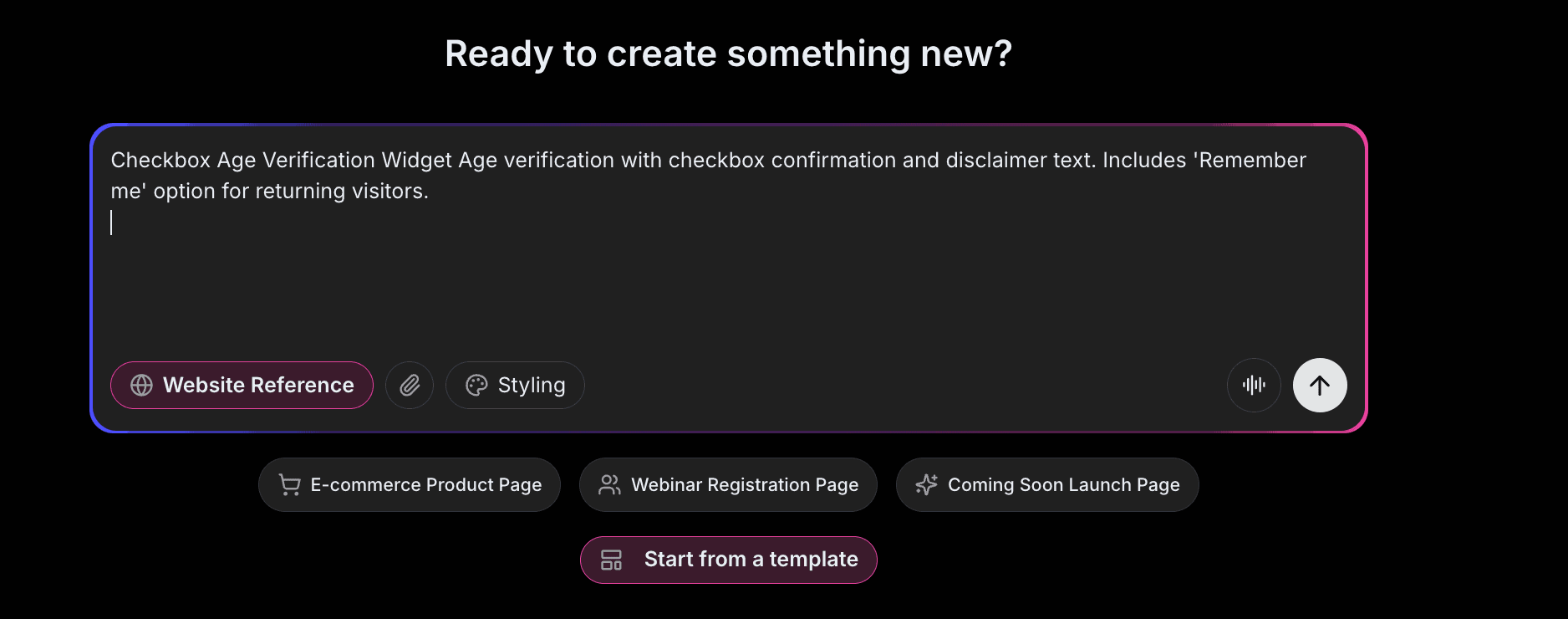
Open Embeddable and describe your age gate in natural language. Here's the exact prompt we'll use:
Build an age verification popup for a wine website. Ask "Are you 21 years of age or older?" with "Yes, I am 21+" and "No, I am under 21" buttons. Add a disclaimer about drinking responsibly. If they click No, show a message that they cannot access the site. If Yes, close the popup and remember their choice for 30 days.
That's it! The AI understands what you want and builds the complete age verification with:
- Modal popup overlay
- Clear age question
- Yes/No buttons
- Denial message for underage
- Cookie storage for returning visitors
Step 3: Provide Your Website URL for Design Analysis
Here's where the magic happens. Give Embeddable your website URL, and the AI will:
- Analyze your brand colors and apply them to the popup
- Match your website's fonts and typography
- Style the modal to feel native and on-brand
- Ensure the age gate integrates seamlessly
The result? An age verification that looks like it was built by your design team, not a third-party widget.
Step 4: Refine Your Age Verification
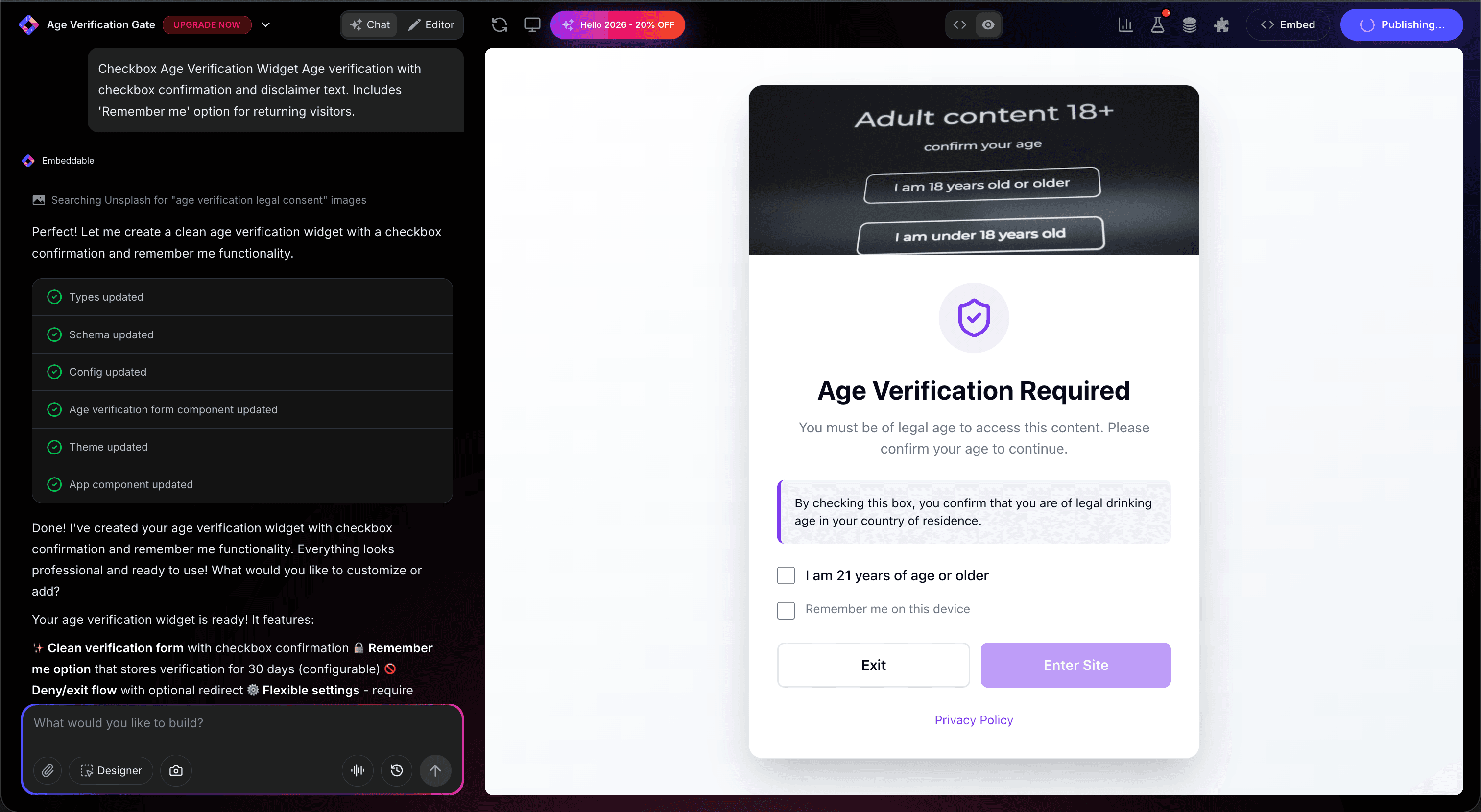
Once the AI generates your popup, you can refine it through conversation:
- "Add date of birth selector instead of Yes/No"
- "Include brand logo at the top"
- "Add checkbox for 'I agree to terms of service'"
- "Show country selector for different age requirements"
- "Make the background blur until verified"
Each change happens instantly. The preview updates in real-time so you can see exactly how your age gate will look and work.
You can also use Embeddable's visual editor to make adjustments yourself - change colors, adjust spacing, modify text, or tweak the layout.
Step 5: Test Your Age Verification
Before embedding, thoroughly test your popup:
- Test Yes: Verify popup closes and site is accessible
- Test No: Confirm denial message appears
- Check Cookie: Clear cookies, verify popup reappears
- Return Visit: Verify remembered choice works
- Check Responsiveness: View on desktop, tablet, and mobile
The preview environment shows exactly how your age verification will appear on your website, so you can catch any issues before going live.
Embedding Your Age Verification on Any Website
Your custom age verification works everywhere. Once you're happy with it, you'll get a simple embed code that works on:
- WordPress: Add to theme or specific pages
- Shopify: Embed in theme for site-wide
- Wix / Squarespace: Add to global footer
- Custom websites: Add to any HTML page
The process is the same everywhere:
- Get Your Embed Code: Click "Publish" and copy the code snippet
- Paste Into Your Website: Add to site header or footer
- Publish Your Page: The age gate goes live immediately
Your age verification automatically:
- Blocks content until verified
- Remembers returning visitors
- Handles denial appropriately
- Adapts to different screen sizes (mobile, tablet, desktop)
- Updates instantly if you change requirements
Types of Age Verification You Can Build
The same process works for any age gate:
Yes/No Confirmation
Simple "Are you 21+?" with buttons. Easiest, minimal friction.
Date of Birth Entry
Visitor enters birthday. More intentional verification.
Country-Specific
Different ages for different regions.
ID Verification
Integration with verification services for high-stakes compliance.
Start with a Template or Build from Scratch
Not sure where to start? Embeddable offers free age verification templates you can customize:
- Simple Age Gate - Yes/No buttons
- Date of Birth Verification - Birthday entry
- Branded Age Popup - Logo and imagery included
- Terms Acceptance - Age + terms checkbox
- Regional Age Gate - Country-specific ages
Choose a template that's close to what you need, then customize it with AI to match your exact requirements. It's the fastest way to get a professional age verification on your site.
Why Age Verification Matters
Age verification serves critical purposes:
Legal Compliance: Many jurisdictions require it.
Liability Protection: Shows you attempted to restrict access.
Brand Trust: Demonstrates responsible business practices.
Industry Standards: Expected in regulated industries.
Peace of Mind: Protects both your business and minors.
Making Your Age Verification More Effective
Take your age gate to the next level with these additions:
Location Detection
Show appropriate age requirements based on visitor location.
Terms Integration
Combine age verification with terms acceptance.
Exit Intent
For declined visitors, offer newsletter signup or age-appropriate content.
Analytics
Track verification acceptance rates.
Custom Denial
Redirect underage visitors to appropriate content or resources.
Embeddable supports integrations with analytics and compliance tools.
Best Practices for Age Verification
For effective, compliant age gates:
- Clear Question: Make the age requirement obvious
- Accessible: Follow accessibility guidelines
- Mobile-Friendly: Large buttons for touch
- Remember Choices: Don't annoy returning verified visitors
- Legal Review: Have specific language reviewed by legal counsel
Legal Considerations
Disclaimer: This is general information, not legal advice. Consult an attorney for your specific situation.
- Requirements vary by jurisdiction
- Some industries have specific regulations
- Record-keeping may be required
- Penalties for non-compliance can be significant
Ready to Build Your Age Verification?
That's it! No developers, no complex cookie logic, no design skills needed. Just describe what you want and AI builds your custom age verification in minutes.
Your age verification will:
- Match your website's design perfectly
- Comply with your age requirements
- Work on every platform and device
- Remember verified visitors
- Update easily when requirements change
Ready to get started?
Option 1: Start with a Template Browse free age verification templates and customize one to your needs.
Option 2: Build Custom with AI Head to Embeddable and describe your age verification - the AI will build it in minutes.
Need More Widget Ideas?
More Tutorials:
- How to Build Custom Widgets for Your Website
- How to Build a Custom Popup for Your Website
- How to Build a Countdown Timer for Your Website
Start protecting your content with custom age verification now!
Build Any Widget with AI in Seconds
Forms, calculators, quizzes, popups & any custom widget — describe it and AI builds it.
Try It FreeFree tier · No credit card