How to Build a Custom Trustpilot Reviews Widget for Your Website in 2026

2/1/2026

Want to show your Trustpilot Reviews on your website? Whether you run an e-commerce store, SaaS product, or service business, displaying Trustpilot reviews builds credibility and boosts conversions. I'll show you how to build a custom Trustpilot Reviews widget in minutes - no coding required.
Want to skip ahead? Browse our free Trustpilot Reviews widget templates and customize one instantly - no need to start from scratch.
Trustpilot is one of the most trusted review platforms globally, with over 300 million reviews. Displaying your TrustScore and verified reviews on your own website gives visitors the confidence to buy.
In this guide, I'll walk you through creating custom Trustpilot Reviews widgets using AI. If you're new to building custom widgets, check out our complete guide on how to build custom widgets first.
Why Display Trustpilot Reviews on Your Website?
Embedding Trustpilot Reviews on your site drives real business results:
- Increase Conversions: Verified reviews at the point of purchase reduce hesitation
- Build Brand Credibility: Trustpilot's green stars are universally recognized as a trust signal
- Reduce Cart Abandonment: Seeing positive reviews during checkout keeps buyers committed
- Improve SEO: Review content adds fresh, keyword-rich text to your pages
- Show Verification: Trustpilot's verified purchase badges add extra authenticity
E-commerce stores show product reviews, SaaS companies display customer feedback, service businesses highlight client satisfaction. Trustpilot reviews work especially well for online businesses.
Building Your Custom Trustpilot Reviews Widget with Embeddable AI
Creating a Trustpilot Reviews widget with Embeddable's AI is straightforward. No coding, no Trustpilot Business subscription required for display - just describe what you want and the AI builds it.
Step 1: Plan Your Reviews Display
Before you begin, think about how you want to show your Trustpilot reviews:
- Layout: Carousel, grid, trust box, or badge?
- Information: Star ratings, review titles, verification badges, dates?
- Filtering: Show only 4-5 star reviews? Recent only?
- Styling: Trustpilot green theme? Match your brand?
- Placement: Product pages, homepage, checkout, or footer?
For our example, we're building a Trustpilot Reviews carousel with green stars and verification badges.
Step 2: Describe Your Reviews Widget to the AI
Open Embeddable and describe your Trustpilot Reviews widget in natural language. Here's the exact prompt we'll use:
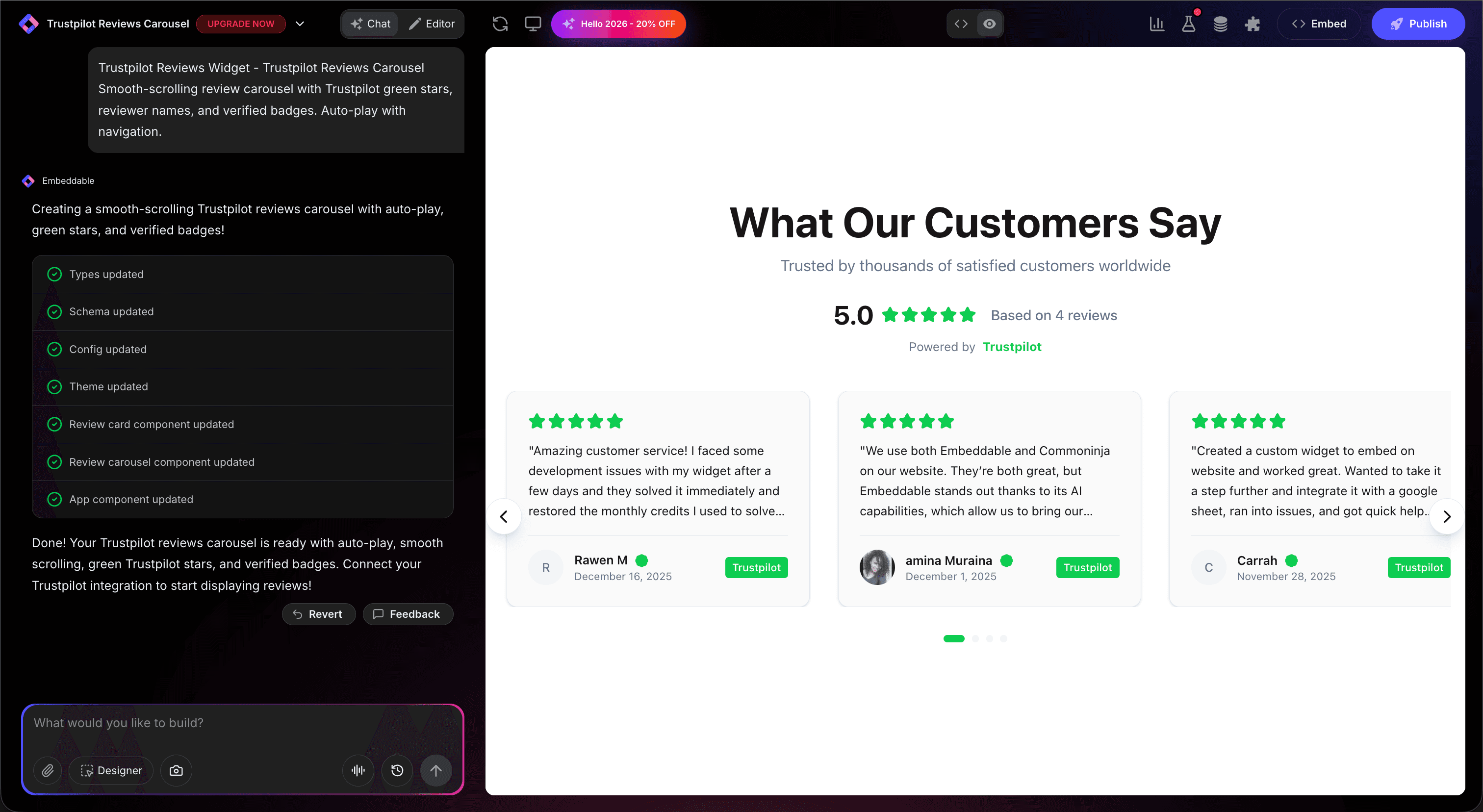
Build a Trustpilot Reviews carousel widget that displays customer reviews with Trustpilot-style green star ratings, review titles, reviewer names, verification badges, and review text. Show the overall TrustScore and total review count at the top. Include smooth auto-scrolling with navigation. Style it with a professional e-commerce look.
That's it! The AI builds the complete widget with:
- Auto-scrolling review carousel
- Trustpilot-style green star ratings
- Review titles and verification status
- Overall TrustScore summary
- Smooth navigation controls
Step 3: Connect Your Trustpilot Reviews Source
After the AI builds your widget, a Reviews panel appears in the CMS editor. This is where you connect your actual Trustpilot reviews:
- Open the Reviews panel in the Content tab of the editor
- Click "Add Source" and select Trustpilot as the source
- Enter your business domain - this is your domain as it appears on Trustpilot (e.g.,
www.example.com) - Click Save - Embeddable will automatically sync your reviews
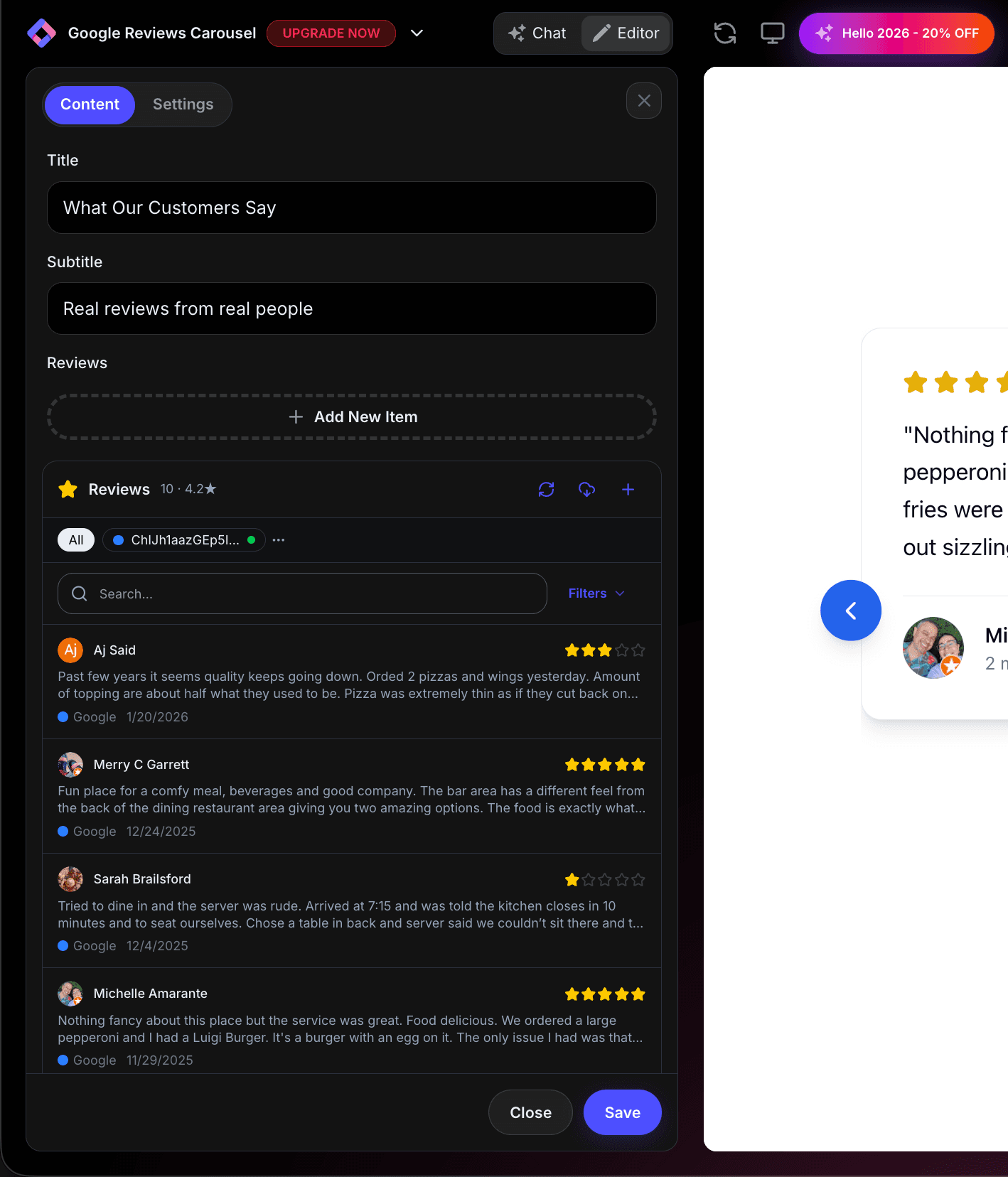
Your real Trustpilot reviews will populate the widget instantly. Live reviews pulled directly from Trustpilot, including review titles, verification levels, and star ratings.
How to find your Trustpilot domain:
Go to your Trustpilot business page. The domain is shown in the URL: trustpilot.com/review/www.yourdomain.com. Use the www.yourdomain.com part.
Step 4: Provide Your Website URL for Design Analysis
Give Embeddable your website URL, and the AI will:
- Analyze your brand colors and apply them to the reviews widget
- Match your website's fonts and typography
- Style the review cards to feel native to your site
- Ensure the widget integrates seamlessly with your product pages
The result? A Trustpilot Reviews widget that looks like a natural part of your website.
Step 5: Refine Your Widget
Once the AI generates your widget, you can refine it through conversation:
- "Only show verified purchase reviews"
- "Add a 'Rate us on Trustpilot' button"
- "Show review titles more prominently"
- "Use Trustpilot green (#00B67A) for the star colors"
- "Display the TrustScore as a large number with stars"
Each change happens instantly. The preview updates in real-time.
You can also use Embeddable's visual editor to make adjustments yourself - change colors, adjust card sizes, modify spacing, or tweak the layout.
Step 6: Test Your Widget
Before embedding, thoroughly test your reviews widget:
- Test Navigation: Click through carousel arrows and pagination
- Check Auto-Play: Verify smooth auto-scrolling
- Verify Ratings: Confirm star ratings match your Trustpilot page
- Check Verification Badges: Ensure verified status shows correctly
- Test Responsiveness: View on desktop, tablet, and mobile
The preview environment shows exactly how your widget will appear on your website.
Embedding Your Trustpilot Reviews on Any Website
Your custom Trustpilot Reviews widget works everywhere. Once you're happy with it, you'll get a simple embed code that works on:
- WordPress / WooCommerce: Paste into product pages or homepage
- Shopify: Add to product pages, cart, or checkout
- Wix / Squarespace: Embed in any section
- Custom websites: Add to any HTML page
The process is the same everywhere:
- Get Your Embed Code: Click "Publish" and copy the code snippet
- Paste Into Your Website: Add where you want the reviews to appear
- Publish Your Page: The reviews go live immediately
Your Trustpilot Reviews widget automatically:
- Syncs reviews when you trigger a refresh
- Displays star ratings, titles, and verification status
- Adapts to different screen sizes (mobile, tablet, desktop)
- Loads fast without slowing down your page
- Matches your website's design
Types of Trustpilot Reviews Widgets You Can Build
The same process works for any display style:
Reviews Carousel
Auto-scrolling slider with green stars and review titles. Perfect for homepages and product pages.
Reviews Grid
Card layout showing multiple reviews with verification badges. Great for dedicated testimonial pages.
Trust Box
Compact summary showing TrustScore, star average, and total reviews. Ideal for headers, sidebars, and checkout pages.
Reviews Badge
Small floating or inline badge with your Trustpilot rating. Perfect for footers, email signatures, and near CTAs.
Mini Trust Widget
Single-line display showing "Rated 4.8/5 on Trustpilot" with stars. Great for checkout flows.
Start with a Template or Build from Scratch
Not sure where to start? Embeddable offers free Trustpilot Reviews templates you can customize:
- Reviews Carousel - Auto-scrolling with green stars
- Reviews Grid - Card grid with verification badges
- Trust Box - Compact TrustScore summary
- Reviews Badge - Minimal inline rating display
Choose a template that's close to what you need, then customize it with AI to match your exact requirements.
Why Trustpilot Reviews Boost E-commerce Sales
Trustpilot Reviews on your website are especially powerful for online businesses:
They Reduce Purchase Anxiety: 89% of consumers check reviews before buying online.
They're Recognized Globally: Trustpilot's green stars are a universal trust symbol.
They Show Verification: Verified purchase badges prove reviews are from real customers.
They Improve Ad Performance: Google Seller Ratings powered by Trustpilot improve ad click-through rates.
They Combat Skepticism: Third-party verified reviews are more trusted than self-hosted testimonials.
Making Your Trustpilot Widget More Effective
Take your reviews widget to the next level:
Place at Checkout
Reviews near the "Buy Now" button reduce cart abandonment by up to 17%.
Show Review Titles
Trustpilot review titles give a quick summary - display them prominently.
Highlight Verified Purchases
Emphasize the "Verified" badge to build extra confidence.
Use on Product Pages
Show product-specific reviews on relevant product pages.
Add to Email Signatures
Embed a mini Trustpilot badge in your email signature for ongoing trust building.
Best Practices for Trustpilot Reviews Widgets
For maximum impact:
- Place Near Purchase Decisions: Reviews at checkout increase conversions
- Show the TrustScore Prominently: The overall score is often more impactful than individual reviews
- Include Review Count: "4.7 from 2,847 reviews" carries more weight than just "4.7 stars"
- Use Trustpilot Colors: The recognizable green builds subconscious trust
- Keep Reviews Current: Fresh reviews show your business is actively delivering
- Don't Over-Filter: A few 3-4 star reviews make the 5-star ones more believable
Ready to Build Your Trustpilot Reviews Widget?
That's it! No developers, no Trustpilot Business API needed, no design skills required. Just describe what you want and AI builds your custom Trustpilot Reviews widget in minutes.
Your widget will:
- Display real reviews synced from Trustpilot
- Match your website's design perfectly
- Work on every platform and device
- Boost conversions and reduce cart abandonment
- Update easily when new reviews come in
Ready to get started?
Option 1: Start with a Template Browse free Trustpilot Reviews templates and customize one to your needs.
Option 2: Build Custom with AI Head to Embeddable and describe your reviews widget - the AI will build it in minutes.
Need More Widget Ideas?
More Tutorials:
- How to Build Custom Widgets for Your Website
- How to Build a Custom Google Reviews Widget
- How to Build a Custom TripAdvisor Reviews Widget
Start showcasing your Trustpilot Reviews and converting more shoppers today!
Build Any Widget with AI in Seconds
Forms, calculators, quizzes, popups & any custom widget — describe it and AI builds it.
Try It FreeFree tier · No credit card